
Intro
In this blog I want to explain how to run your private GitHub Runners (this should work for ADO Agents as well) using the new Azure Container Apps Jobs (in preview) functionality with Workload Profiles (also in preview) using auto-scaling with KEDA.
With this setup there’s no need for a complicated container (AKS) infrastructure deployment (and maintenance!) with enough flexibility, scalability and cost saving.
Container Apps and Jobs don’t support running Docker in containers. Any steps in your workflows that use Docker commands will fail when run on a self-hosted runner or agent in a Container Apps Job.
I have created a public GitHub repo where you can find all the code related to this post, mostly in Terraform (I have added also Azure CLI scripts).
While I was writing this post, Microsoft published a post like this one, but in the examples there’s no Workload Profile functionality with VNET Integration which supports user defined routes (UDR) and egress through NAT Gateway (or Azure Firewall in a hub and spoke setup) which make possible to run the runners in a private environment, to connect to your Azure resources without public access.
Using Azure Container App Jobs is the perfect use-case for this kind of scenarios, the Jobs are made for on-demand processing, exactly what GitHub Runners jobs are.
Azure Container Apps supports auto scaling with KEDA scalers, GitHub has created its own one, which I use in this post. There’s also a scaler for Azure DevOps Agents.
Every KEDA scaler has a different setup/variables, depending also for the purpose you need to apply.
In my example I am running a docker image created for the Azure Terraform Cloud Adoption Framework, which has some specific tooling installed (Rover, Terraform, Az CLI etc..) to run the Terraform configurations I need to deploy for my landing zones. Some environment variables I will use to run this container are specific for this purpose, you have to look at your image specification and change them accordingly. I will try to explain the setup as best as possible so you will be able to apply or modify it for the containers you will need to run.
Implementation
I am using Terraform for this examples, but using the AzAPI resource provider, because the functionality is still in preview and the Container App resource in Terraform does not support (yet) this. On the other side, it’s easier to port the code to ARM/Bicep as they look quiet the same.
I don’t know why, but after a deployment (Terraform apply) if I rerun the plan Terraform keeps updating the resources, I tried multiple things (like ignore_missing_property etc..) but I wasn’t able to solve it. Maybe someone has a solution, please comment your ideas.
First of all, to run in an “internal” environment we need to create a vnet with subnet delegated to the Microsoft.App/environments service:
resource "azurerm_resource_group" "rg_runners_aca_jobs" {
  name     = "rg-ghrunnersacajobs-tf"
  location = "North Europe"
}

resource "azurerm_virtual_network" "vnet_runners_aca_jobs" {
  name                = "vnet-ghrunnersacajobs-tf"
  location            = "North Europe"
  resource_group_name = azurerm_resource_group.rg_runners_aca_jobs.name
  address_space       = ["10.0.0.0/23"]
}

resource "azurerm_subnet" "subnet_runners_aca_jobs" {
  name                 = "snet-ghrunnersacajobs-tf"
  resource_group_name  = azurerm_resource_group.rg_runners_aca_jobs.name
  address_prefixes     = ["10.0.1.0/27"]
  virtual_network_name = azurerm_virtual_network.vnet_runners_aca_jobs.name
  delegation {
    name = "containerapps"
    service_delegation {
      name    = "Microsoft.App/environments"
      actions = ["Microsoft.Network/virtualNetworks/subnets/join/action"]
    }
  }
}
Your private runners will have then network reach to other vnets (if peered) of resources connected to the same VNet.
Azure Container Apps requires a Log Analytics Workspace, and I want to run the Jobs possibly to be able to use a User Manged Identity, so let’s create them:
resource "azurerm_log_analytics_workspace" "la_runners_aca_jobs" {
  name                = "la-ghrunnersacajobs-tf"
  location            = azurerm_resource_group.rg_runners_aca_jobs.location
  resource_group_name = azurerm_resource_group.rg_runners_aca_jobs.name
  sku                 = "PerGB2018"
  retention_in_days   = 30
}

resource "azurerm_user_assigned_identity" "uai_runners_aca_jobs" {
  location            = azurerm_resource_group.rg_runners_aca_jobs.location
  name                = "umi-ghrunnersacajobs-tf"
  resource_group_name = azurerm_resource_group.rg_runners_aca_jobs.name
  tags                = {}
}
Let’s now create the Azure Container App Environment with Workload Profiles, using the AzAPI:
resource "azapi_resource" "acae_runners_jobs" {
  type      = "Microsoft.App/managedEnvironments@2023-04-01-preview"
  name      = "acaeghrunnersacajobs-tf"
  parent_id = azurerm_resource_group.rg_runners_aca_jobs.id
  location  = azurerm_resource_group.rg_runners_aca_jobs.location

  schema_validation_enabled = false

  body = jsonencode({
    properties = {
      appLogsConfiguration = {
        destination = "log-analytics"
        logAnalyticsConfiguration = {
          customerId = azurerm_log_analytics_workspace.la_runners_aca_jobs.workspace_id
          sharedKey  = azurerm_log_analytics_workspace.la_runners_aca_jobs.primary_shared_key
        }
      }
      vnetConfiguration = {
        dockerBridgeCidr       = null
        infrastructureSubnetId = azurerm_subnet.subnet_runners_aca_jobs.id
        internal               = true
        platformReservedCidr   = null
        platformReservedDnsIP  = null
      }
      workloadProfiles = [
        {
          name                = "wl-gh-runners"
          workloadProfileType = "D4"
          minimumCount        = 0
          maximumCount        = 3
        }
      ]
    }
  })
}
I am using API version 2023-04-01-preview which is not (yet) documented by Microsoft, but available in the provider (at least in West and North Europe).
In this blog I have hardcoded all the properties, but in the repo everything is using variables (see the terraform.tfvars.example for all the variables contents).
You can provide multiple workload profile type, the different types and specs can be found here.
During my tests I was trying to keep the costs as low as possible so I set the minimumCount to 0, unfortunately when creating the Azure Container App Jobs (see later) the GitHub KEDA scaler was not working, when I started a GitHub Action nothing happened.
I discovered I needed to create a Workload Profile with at least 1 instance running, deploy the Container App Job with the KEDA scaler and afterwards you can then set the minimumCount to 0, so everything
will be spinned up by the KEDA scaler when a GitHub Action is starting and then after about 15-30 minutes the instances will be removed, keeping the costs low.
I hope this will be solved during the preview or after GA, or at least be documented in a good way.
Let’s now create a Container App Job linked to the Container App Environment just created and using the Workload Profile defined before:
resource "azapi_resource" "acaj_runners_jobs" {
  type      = "Microsoft.App/jobs@2023-04-01-preview"
  name      = "acajrunnersjobs-tf"
  location  = azurerm_resource_group.rg_runners_aca_jobs.location
  parent_id = azurerm_resource_group.rg_runners_aca_jobs.id
  tags      = {}

  identity {
    type         = "UserAssigned"
    identity_ids = [azurerm_user_assigned_identity.uai_runners_aca_jobs.id]
  }

  # Need to set to false because at the moment only 2022-11-01-preview is supported
  schema_validation_enabled = false

  body = jsonencode({
    properties = {
      environmentId       = azapi_resource.acae_runners_jobs.id
      workloadProfileName = "wl-gh-runners"
      configuration = {
        secrets = [
          {
            name  = "pat-token-secret"
            value = "ghp_THIS_IS_YOURS_GH_TOKEN"
          }
        ]
        triggerType           = "Event"
        replicaTimeout        = 604800
        replicaRetryLimit     = 1
        manualTriggerConfig   = null
        scheduleTriggerConfig = null
        registries            = null
        dapr                  = null
        eventTriggerConfig = {
          replicaCompletionCount = null
          parallelism            = 1
          scale = {
            minExecutions   = 0
            maxExecutions   = 10
            pollingInterval = 30
            rules = [
              {
                name = "github-runner"
                type = "github-runner"
                metadata = {
                  owner       = "devops-circle"
                  repos       = "gh-runners-aca-jobs"
                  runnerScope = "repo"
                }
                auth = [
                  {
                    secretRef        = "pat-token-secret"
                    triggerParameter = "personalAccessToken"
                  }
                ]
              }
            ]
          }
        }
      }
      template = {
        containers = [
          {
            image   = "aztfmod/rover-agent:1.3.9-2306.2308-github"
            name    = "ghrunnersacajobs"
            command = null
            args    = null
            env = [
              {
                name  = "EPHEMERAL"
                value = "true"
              },
              {
                name  = "URL"
                value = "https://github.com"
              },
              {
                name      = "GH_TOKEN"
                secretRef = "pat-token-secret"
              },
              {
                name  = "GH_OWNER"
                value = "devops-circle"
              },
              {
                name  = "GH_REPOSITORY"
                value = "gh-runners-aca-jobs"
              },
              {
                name  = "LABELS"
                value = "label1,label2,label3"
              }
            ]
            resources = {
              cpu    = 2
              memory = "4Gi"
            }
            volumeMounts = null
          }
        ]
        initContainers = null
        volumes        = null
      }
    }
  })
}
The code is a bit long, I will try to explain it piece by piece, because a lot of specific configurations are involved here.
The link to the Container App environment and Workload Profile are at line 18-19, for the Workload Profile I use a variable which contents is the same as the Workload Profile name created in the App Environment:
job_workload_profile_name = "wl-gh-runners"
All the jobs running will use this Workload Profile, at line 70-71 you can specify the job’s resources needed to execute, but remember, every job is constrained with the CPU/Memory depending on the Workload type defined (in our case a D4, which means 4 CPU’s and 16 GiB memory per instance).
If the running jobs exceeds the instance type specs, the number of instances will be scaled out, obviously respecting the scaling rules defined in the Workload Profile settings (in this example max. 3 instances). After the jobs are finished the instances will be scaled in to the minimum (in our case 0) in about 15 minutes of inactivity.
Read my previous note, I have created first everything (Container App Environment and Container Job) with minimumCount set to 1 instance, then redeployed again with minimumCount set to 0.
GitHub Runners KEDA Scaler setup
I am using the GitHub Keda Scaler to auto scale the containers, KEDA is the “interface” which Azure Container Apps uses for scaling.
The lines involving the configuration of the scaler are 34-59 from the previous code:
        eventTriggerConfig = {
          replicaCompletionCount = null
          parallelism            = 1
          scale = {
            minExecutions   = 0
            maxExecutions   = 10
            pollingInterval = 30
            rules = [
              {
                name = "github-runner"
                type = "github-runner"
                metadata = {
                  owner       = "devops-circle"
                  repos       = "gh-runners-aca-jobs"
                  runnerScope = "repo"
                }
                auth = [
                  {
                    secretRef        = "pat-token-secret"
                    triggerParameter = "personalAccessToken"
                  }
                ]
              }
            ]
          }
        }
The content of the properties apply to my specific repo, the Keda scaler can be configured in different ways, as suggested in the documentation it is better to use the “repo” scope.
For authentication the auth section (line 50 -55) refers to the name of the secret (line 23), which is the GitHub PAT token.
For the GitHub token permissions I have used the following permissions:
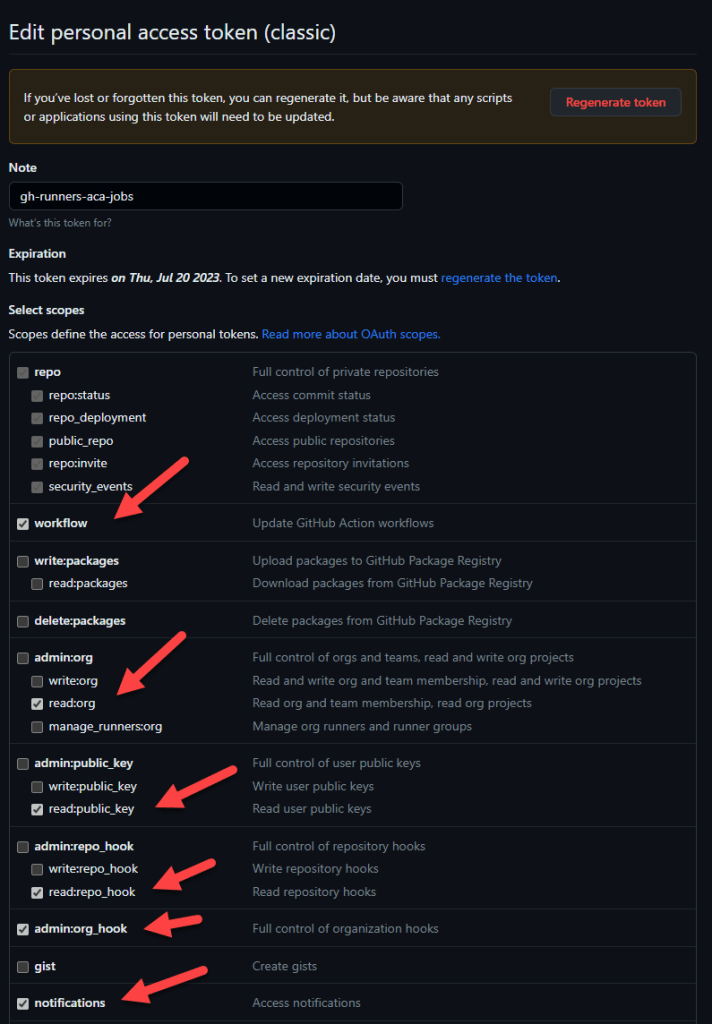
In this case I am using the same secret (same GitHub PAT token) for the KEDA scaler configuration and the GitHub runners authentication, you can use different PATs for both.
Then for each PAT token less permissions should be needed.
Line 62-100 is the container configuration where you can setup the environment variables needed for the container to run properly. This is obviously specific for the container you want to run, but most of the variables should be familiar because this is what a GitHub runners needs to run.
As stated before here I am referring to the same secret for the GitHub PAT token as the KEDA scaler.
Issues – Problems
During this setup I encountered some issues which I will list here below, hopefully during the preview they will be fixed.
Using the consumption profile
During development, in this setup I also tried to use the Consumption profile which is always available, unfortunately the containers are not being cleaned up after a run (using exactly the same configuration as I did with the Dedicated Plan), they keep running.
When using the “normal” Consumption Only environment (without a Dedicated Plan setup like in this blog), this problem didn’t happened.
But using the “normal” Consumption Only environment, also in internal mode, you can’t rely on UDR, NAT Gateways or NVAs, see here. That’s exactly why I choose to use a Dedicated Plan.
KEDA Scaler not initialized
See my note before.
KEDA Scaler loosing the trigger after some time
This is probably the most annoying issue because this impacts the low cost setup.
After setting up the Dedicated Plan to 0 instances, the KEDA scaler was working properly for a while. Even when there were no active Dedicated Plan instances running, after I started a GitHub workflow, in 4-5 minutes a new instance was created and the jobs were running as excepted, then in about 15 minutes everything scaled down if no more GitHub workflows were started.
I didn’t start any workflows/jobs for 1 or 2 days and when I did, I discovered nothing was happening, the KEDA scaler was not triggering anything. Also the run history of the jobs was completely empty, as something like a “state” was lost.
I did some tests and this usually happens after 12 hours when no workflows/jobs are started.
To fix this issue, I had to setup the Dedicated Plan to at least 1 instance, delete the Container Job resource in Azure (not the Azure Container App Environment resource), redeploy it and then set the minimal instance back to 0 for cost savings, but this could cause the problem again, read next how to prevent it.
To prevent this “loss of state”, you can schedule a GitHub workflow to run like every 4 or 8 hours, this will obviously cost some extra money because the Dedicated Plan will spin up an instance and run for a while (mostly 15 minutes) and then scaled back to 0, but I think this is acceptable.
I hope Microsoft will look into these issues and solve them, or at least document them if they are intended as designed.
Please do not hesitate to comment, ask questions, give feedback or even create a PR 🙂
 Marco Mansi's Blog
Leave a comment